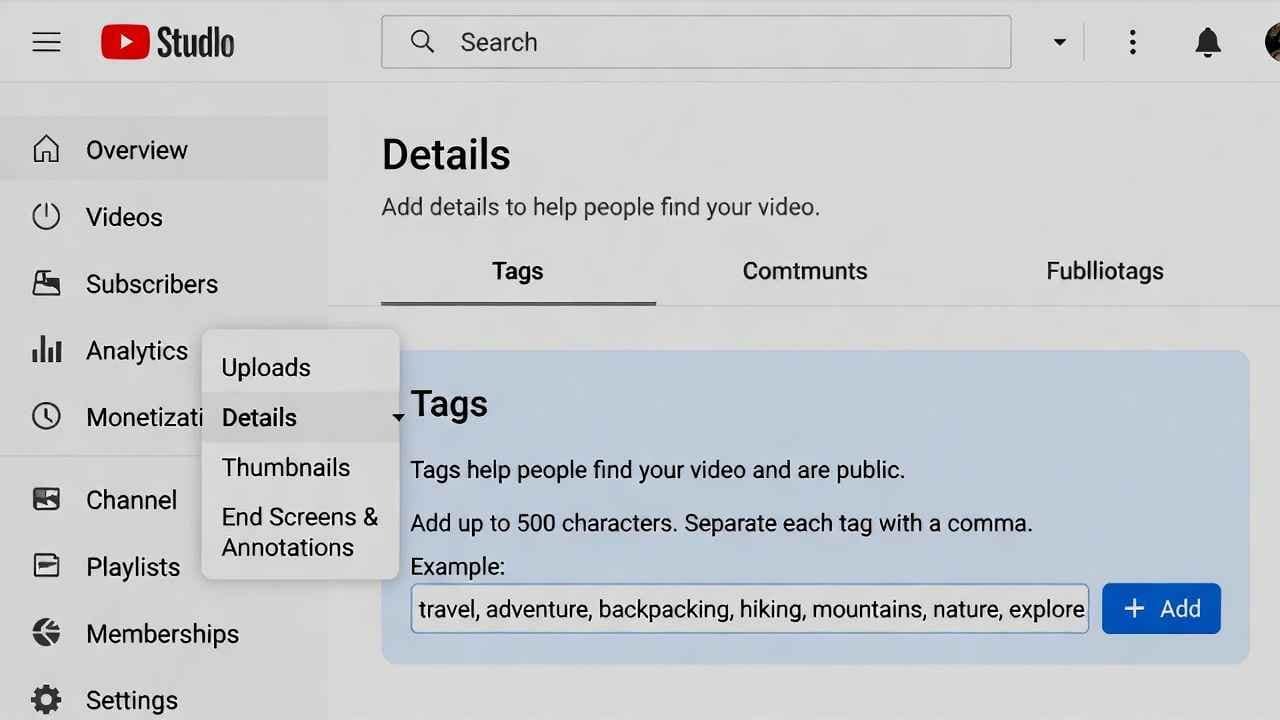
Your YouTube videos deserve more views—but in 2026, old-school tag stuffing won’t cut it anymore. The algorithm has shifted dramatically toward AI-driven understanding,YouTube tags 2026 viewer satisfaction, and retention signals. Tags? They’re no longer the powerhouse they were in 2015.
Yet many creators still waste time obsessing over them while ignoring what actually drives growth. This updated 2026 guide cuts through the myths, shows you the current step-by-step process to add tags (because the interface hasn’t changed much), and reveals realistic best practices that provide a small but meaningful edge—especially for niche content, misspellings, and Shorts.
Whether you’re a beginner trying to get your first 1,000 subscribers or an established creator optimizing old videos, you’ll get clear, YouTube tags 2026 no-fluff steps to implement right now.
Why YouTube Tags Matter Less in 2026 (But Aren’t Completely Useless)
YouTube’s official stance and creator tests confirm: tags play a minimal role—often estimated at 1% or less—in video discovery and ranking.
Since around 2015, Google Brain (now advanced AI) analyzes:
- Video content (visuals, audio, auto-transcripts)
- Title and description (primary signals)
- Viewer behavior (watch time, satisfaction, re-watches)
- Engagement (likes, comments, shares)
Tags help in these narrow cases:
- Catch common misspellings or variations (“budjet laptops” instead of “budget laptops”)
- Provide extra context for very niche topics
- Slightly nudge Shorts feed categorization
For most videos, irrelevant or spammy tags do nothing—or worse, confuse the system. Focus 80% of your SEO energy on title, thumbnail, first 15 seconds hook, and retention.
Step-by-Step: How to Add Tags to a New YouTube Video in 2026
The upload process remains straightforward.
- Log in to YouTube and click the Create button (camera + icon) top right.
- Choose Upload video.
- Select your file and wait for processing.
- In the Details tab, complete title, description, thumbnail.
- Click Show more to expand options.
- Scroll to the Tags field.
- Enter tags separated by commas or Enter key—they appear as chips.
- Total limit: 500 characters (including spaces).
- Proceed to visibility and publish.
Quick win: Put your exact primary keyword first—it may get slight priority in processing.
How to Start a YouTube Channel 2026: Begin Today & Make Summer 2026 Your Breakthrough Season
How to Edit or Add Tags to Existing Videos (Including Bulk Edits)
Old videos can get a refresh.
- Head to YouTube Studio.
- Left menu: Content.
- Click the video title or thumbnail.
- In Details, expand SHOW MORE.
- Edit the Tags section.
- Save changes.
Mobile app method:
- Library > Your videos.
- Tap video > pencil icon.
- Details > add/edit tags.
Changes propagate quickly, but full re-indexing might take hours. Use this for evergreen content—add current-year variations like “2026 tips.”
Realistic Best Practices for YouTube Tags in 2026
Don’t chase 50 tags. Aim for quality and relevance.
1. Keep It Minimal and Targeted (5–12 Tags Max)
Overloading dilutes focus. Many experts now recommend 5–10.
2. Prioritize These Types
- Primary keyword phrase (first)
- Close variations and long-tail
- Common misspellings/typos
- Niche-specific synonyms
Example for “Best AI Writing Tools 2026”:
- best ai writing tools 2026
- ai writing tools 2026
- best ai writer 2026
- ai content generator 2026
- best ai tools for writers
- ai writing assistant
- grok ai writing
- chatgpt alternatives 2026
3. Handle Shorts Differently
Shorts benefit more from tags + hashtags.
- Use 3–5 niche-specific hashtags in description (#AIWriting #WritingTools2026)
- Backend tags help feed placement
4. Skip These Completely
- Generic spam (“viral”, “best”, “2026” alone)
- Unrelated trending tags
- Over 15 tags (risks ignoring all)
5. Tools to Research Smart Tags
- YouTube search suggest/autocomplete
- Competitor videos (right-click > View page source > search “keywords” for tags—though less reliable now)
- Free tools like VidIQ or TubeBuddy for keyword volume
6. Combine with Stronger Signals
Tags support; prioritize:
- Hook in first 5 seconds
- High retention (aim >50%)
- Detailed description with timestamps
- Eye-catching custom thumbnail
Common Myths and Mistakes Creators Make in 2026
Myth: More tags = more views Reality: Quality and relevance win. Spammy tags get ignored.
Mistake: Copying competitor tags blindly Many competitors still use outdated strategies.
Mistake: Ignoring hashtags Hashtags (#) in description (3–5 max) appear above title and help grouping—more useful than backend tags for some niches.
Objection: “But my niche is super competitive” Use tags for misspellings and ultra-specific long-tails to capture fringe searches.
Conclusion: Tag Smarter, Not Harder, in 2026
YouTube tags aren’t dead—they’re just demoted. In 2026, they offer a tiny assist for context and typos, but real growth comes from viewer-first content: hooks, retention, and satisfaction.
Add tags during every upload or edit using the steps above. Keep them relevant, limited, and strategic. Then shift focus to what the algorithm truly rewards.
Test on your next video, check analytics (traffic sources, impressions), and iterate. Small edges compound.
Ready to optimize? Open YouTube Studio now and update one video.
Read More
How to Use AI Agents for YouTube Scriptwriting 2026 (Save Hours & Go Viral)
How to Choose the Best YouTube Tags to Get Views in 2026
Royalty Free Sound Effects for Videos: Best Free Sources in 2026 (No More Muted Edits!)
Royalty Free Videos for YouTube: Best Free Sources in 2026 (No More Copyright Strikes!)
FAQ: Most Asked Questions About YouTube Tags in 2026
Do YouTube tags still matter in 2026? Minimally—about 1% impact for most videos. They help slightly with misspellings, variations, and niche context, but AI analyzes content directly. Title, thumbnail, retention, and satisfaction dominate.
How many tags should I use on YouTube in 2026? 5–12 relevant ones. Stay under 500 characters. Quality over quantity—more can dilute focus.
How do I add tags to a YouTube video? During upload: Details > Show more > Tags field. For existing: YouTube Studio > Content > select video > Details > Show more > Tags. Mobile app supports editing too.
Can I edit tags after publishing? Yes, anytime in YouTube Studio or app. Changes help re-indexing, especially for evergreen content.
What’s the difference between tags and hashtags on YouTube? Tags: backend keywords (no #) in the dedicated field. Hashtags: add # in description/title (3–5 max); they show above title and help categorization/Suggested videos.
Should I use hashtags in 2026? Yes, strategically—3–5 relevant ones in description. More useful than tags for Shorts and grouping content.
How do I find good tags for my YouTube video? YouTube autocomplete, competitor research, keyword tools (VidIQ/TubeBuddy). Focus on search intent and variations.
Can using bad or irrelevant tags hurt my video? Rarely penalize, but they confuse AI and waste space. Always stay relevant to avoid dilution.