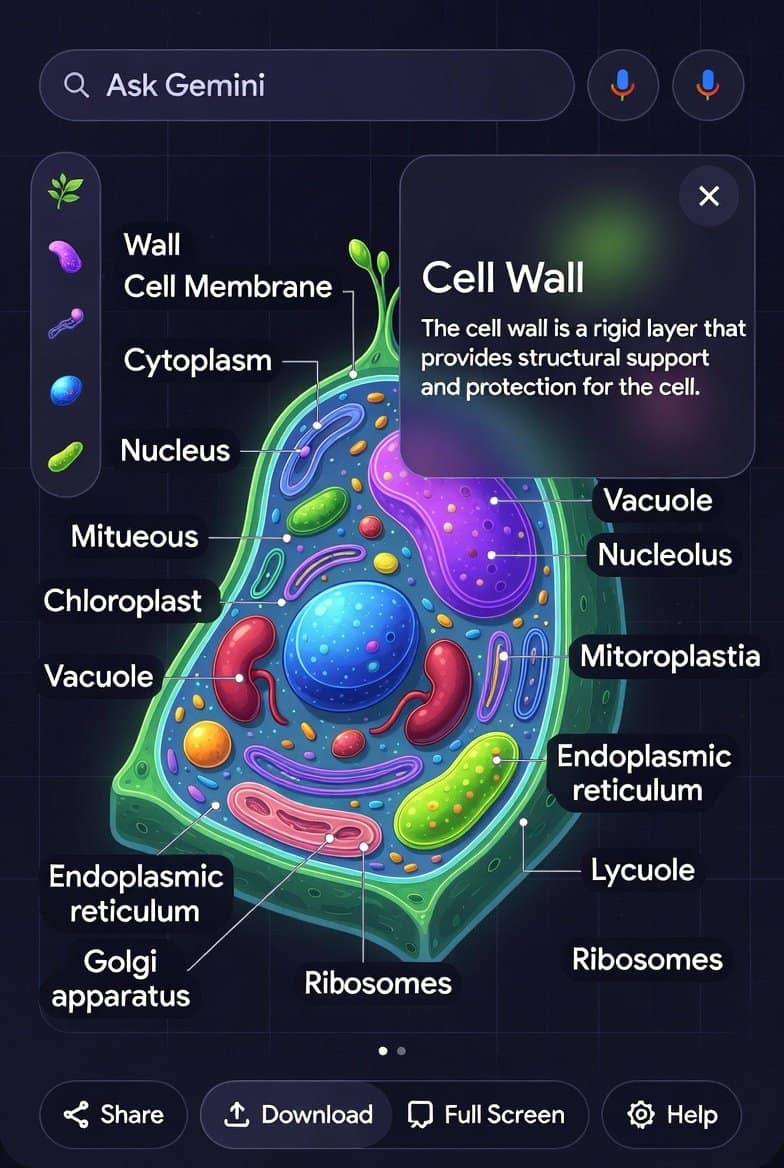
Imagine staring at a boring diagram of a cell in biology class. You wonder what each part does, but the textbook just sits there. Silent.
Now picture this: You ask Google Gemini for that same diagram. It generates a beautiful image. Then you tap on the nucleus. Boom – a panel pops up with a clear explanation. Tap the mitochondria? Instant details on energy production.
That’s the power of Gemini interactive images in 2025. Google rolled this out late last year, and it’s changing how we learn, create, and explore ideas.
Hey, friend. If you’re like me, you’ve played with AI image generators before. But this? This is next level. Gemini doesn’t just make pretty pictures. It makes them alive.
Let’s dive in. I’ll walk you through what it is, how to use it, real examples, and why it’s blowing up right now.
What Are Gemini Interactive Images Exactly?
Gemini interactive images are AI-generated visuals you can click or tap on for more info.
Google launched this in November 2025 as part of Gemini 3 updates. It’s built on advanced multimodal AI. The model understands images, text, and context all at once.
Key highlights:
- Clickable hotspots — Tap parts of the image for explanations, definitions, or follow-up questions.
- Perfect for education — Great for science diagrams like cells, anatomy, chemistry molecules, or physics concepts.
- Any topic — Not just school stuff. Try history maps, business charts, or fun stuff like fantasy worlds.
- Powered by Gemini 3 — Uses the latest model for smarter responses and better visuals.
It’s rolling out in the Gemini app and web. Free users get basic access. Pro or Ultra subscribers get unlimited and advanced options.
This builds on earlier features like Nano Banana image generation. But now, images aren’t static. They’re interactive tools.
Why Gemini Interactive Images 2025 Are a Game-Changer
Static images are forgettable. Interactive ones stick.
Think about it. When you actively tap and explore, you remember more. Studies show interactive learning boosts retention by up to 75%.
In 2025, with AI everywhere, this stands out.
- For students → Make studying fun. No more boring flashcards.
- For teachers → Create custom diagrams instantly.
- For creators → Build engaging content for blogs or social media.
- For everyone → Explore hobbies deeper. Ask about a guitar chord diagram and tap strings for notes.
Google says it’s transforming “passive viewing into active exploration.” I agree. I tried it with a solar system diagram. Tapping planets gave facts, distances, and even fun trivia.
Mind blown.
How to Create and Use Interactive Images in Google Gemini
It’s super easy. No tech skills needed.
Step-by-step guide:
- Open the Gemini app or go to gemini.google.com.
- Sign in with your Google account.
- Type a prompt like: “Create an interactive diagram of the human digestive system with clickable labels.”
- Gemini generates the image.
- Tap or click parts to interact.
- Ask follow-ups like “Explain the role of the small intestine.”
Pro tips for best results:
- Be specific in prompts. Say “interactive clickable diagram” or “tappable labels.”
- Use for complex topics: Biology, physics, anatomy, geography.
- Combine with Deep Research for richer info.
- On mobile? Perfect for tapping on the go.
If you’re on free plan, you might hit limits. Upgrade to Pro for more.
Want hosting for your own AI experiments or blog? I love Hostinger – affordable, fast, and AI-friendly setups. Great for WordPress sites like this one.
Real Examples of Gemini AI Clickable Images
Let’s see it in action. Here are some I made recently.
Example 1: Plant Cell Diagram
Prompt: “Generate an interactive plant cell diagram with clickable organelles.”
Result: Beautiful labeled image. Tap chloroplast → Explains photosynthesis. Tap vacuole → Storage details.
Perfect for high school biology.
Example 2: Water Cycle
Prompt: “Interactive water cycle diagram showing evaporation, condensation, and precipitation.”
Tap clouds → Learn about rain formation. Super helpful for kids or quick refreshers.
Example 3: Solar System
Prompt: “Clickable solar system map with planets and facts.”
Tap Jupiter → Moons, storms, size comparison. Felt like exploring space.
Example 4: Business Funnel
Prompt: “Interactive sales funnel diagram for marketing.”
Tap stages → Strategies for each. Great for work.
You can do history timelines, recipe steps, or even fantasy maps.
Gemini Interactive Learning Images for Education
This shines brightest in learning.
Google focused on students first. Interactive images cover:
- Biology (cells, anatomy)
- Chemistry (periodic table, reactions)
- Physics (forces, circuits)
- Math (graphs, geometry)
No more memorizing labels. Explore at your pace.
Teachers use it for custom lessons. Parents for homework help.
In 2025, schools integrate Gemini more. This feature makes AI a true tutor.
Tips to Get the Most Out of Gemini Clickable Images
Start simple. Build up.
- Use clear prompts: “Make this diagram interactive with tappable parts and explanations.”
- Follow up: After tapping, ask “Why is this important?”
- Combine tools: Add to Canvas for quizzes or reports.
- Edit images first: Use Nano Banana Pro for base, then make interactive.
For stock images in your projects, check Shutterstock – millions of pro visuals to inspire prompts.
Read More-Google Meet Live Translation: The Game-Changer That’s Making Video Calls Truly Global in 2025
9 SEO Mistakes You Can’t Ignore in 2026 (And How to Fix Them Fast)
How to Rank in Google AI Overviews (GEO): GEO Strategies For Beginners to Boost Visibility Fast
Limitations and What’s Next
It’s awesome, but not perfect yet.
- Works best on diagrams, not all photos.
- Availability varies by region/language.
- Advanced features need Pro/Ultra.
- Sometimes explanations are basic.
Google promises more in 2026: Animations, 3D, deeper interactions.
Exciting times.
FAQs About Gemini Interactive Images 2025
What are Gemini interactive images?
They’re AI-generated diagrams where you tap parts for instant explanations and details.
How do I create interactive images in Google Gemini?
Prompt Gemini with “create an interactive diagram of [topic]” in the app or web.
Is Gemini interactive images free?
Basic access is free. Unlimited and advanced need Google AI Pro or Ultra.
Can I use Gemini AI clickable images for studying?
Yes! Best for science, math, and complex topics. Boosts understanding big time.
What topics work best for interactive images in Google Gemini?
Biology diagrams, anatomy, chemistry, physics, geography maps, and processes like water cycle.
How is this different from regular AI image generation?
Regular images are static. These are clickable and educational.
Do I need the latest Gemini update for interactive diagrams?
Yes, rolled out with Gemini 3 in late 2025.
Can teachers use Gemini interactive learning images in class?
Absolutely. Create custom clickable diagrams instantly.
Are Gemini clickable images available on mobile?
Yes, tapping works great on the Gemini app.
What’s the future of AI interactive images like Gemini’s?
Expect more animations, 3D models, and real-time interactions in 2026.
There you have it, friend. Gemini interactive images 2025 are here to make learning and creating more fun.
Try it today. Ask Gemini for a diagram of your favorite topic. Tap around. See the magic.
What will you create first? Drop a comment below – I read them all.
TAMZIDUL HAQUE 🖋️Writer- https://tamzidulhaque.com/ https://passiveprofitsworld.com/ https://appsoftguide.com/ https://abraronlineshop.com/ https://medium.com/@tamzidulhaque