
Hey there, folks – Tamzidul Haque here, your go-to guy for unpacking the wild world of tech that actually makes life easier (and sometimes weirder). If you’ve been glued to your screen like me, scrolling through endless tabs while your coffee goes cold, today’s news from OpenAI is gonna hit different. Picture this: No more fumbling with that clunky address bar. Instead, you’re chatting with ChatGPT like it’s your smart buddy, pulling up recipes, booking flights, or even shopping for groceries – all without lifting a finger beyond typing a quick prompt.
That’s the vibe OpenAI is serving up with ChatGPT Atlas, ChatGPT Atlas browser features their shiny new AI-powered web browser that officially launched on October 21, 2025. Yeah, you read that right – just yesterday as I’m typing this on October 22. Sam Altman and the crew didn’t just tweak an old browser; they built one from the ground up, with ChatGPT baked right into the core. It’s like if your Google Chrome suddenly grew a brain and started anticipating your every move. And in a world where AI is sneaking into everything from your fridge to your fitness tracker, this feels like the next logical (and kinda mind-bending) step.
But hold up – is this the browser revolution we’ve been waiting for, or just another shiny toy that’ll collect digital dust? As someone who’s tested every gadget under the sun (and earned a tidy sum sharing honest takes on them), I’m diving deep today. We’ll break down the ChatGPT Atlas browser features, compare it head-to-head with Google Chrome, and even walk you through how to download ChatGPT Atlas if you’re ready to jump in. Plus, I’ll share a real story from my own chaotic morning that proves why this matters for busy pros in the USA and Canada. Stick around – by the end, you’ll know if it’s time to wave goodbye to your old tabs.
ChatGPT Atlas browser features:
Let’s rewind a bit, because context is everything in tech launches like this. OpenAI’s been on a tear since ChatGPT exploded in late 2022, racking up over 800 million weekly users by mid-2025. That’s a ton of folks chatting with AI for everything from essay outlines to date ideas. But here’s the rub: Most of us still fire up Chrome or Safari for the heavy lifting – searching, shopping, scrolling news. Google owns about 72% of the browser market, turning every click into ad gold. OpenAI? They’re the scrappy underdog, burning cash to build something bigger than just a chatbot.
Enter OpenAI web browser launch 2025: Atlas isn’t a side project; it’s a direct shot at Google’s empire. Altman called it during the livestream: “This is an A.I.-powered web browser built around ChatGPT. We think that A.I. represents a rare once-a-decade opportunity to rethink what a browser can be.” Translation? Tabs were cool in 2008, but in 2025, with AI agents handling tasks autonomously, why settle for pointing and clicking?
From Ahrefs and SEMrush trends, searches for “AI web browser” spiked 45% in the last quarter, especially in tech hubs like San Francisco and Toronto. Pinterest boards on “future browsing tools” are blowing up too – think sleek mockups of chat-based interfaces pinned alongside productivity hacks. OpenAI timed this perfectly, right after Perplexity dropped their Comet browser in July and Microsoft beefed up Edge with Copilot. It’s the browser wars 2.0, and AI is the secret weapon.
My “Aha” Moment: A Real-Life Mess That Atlas Could’ve Saved
Okay, confession time – because what’s a tech blog without some storytelling? This morning (October 22, bleary-eyed at 6 AM in my Toronto home office), I was prepping for a client call on sustainable energy trends. Step 1: Google “thorium reactors 2025 updates.” Boom, 20 tabs later, I’m drowning in PDFs, Reddit threads, and a sketchy blog post. Step 2: Cross-reference with market data? Copy-paste nightmare. Step 3: Book a flight to a conference in Seattle for next week? Another 15 minutes lost to forms and error messages. Total time: 45 minutes. Coffee? Stone cold. Sanity? Questionable.
Now, imagine swapping Chrome for ChatGPT Atlas. I’d type into the chat window: “Summarize latest thorium reactor news from reliable sources, pull stock impacts, and book the cheapest Seattle flight leaving Friday.” Done. Agent mode kicks in, scours the web, summarizes in plain English, and even handles the booking – all while explaining its steps so you stay in control. No tabs. No frustration. Just results.
That’s the promise here, and it’s hitting home for remote workers and entrepreneurs like us in North America. With hybrid schedules the norm (per recent StatsCan data, 40% of Canadians still WFH full-time), tools that cut busywork are gold. Atlas isn’t just tech; it’s a time-saver disguised as a browser.
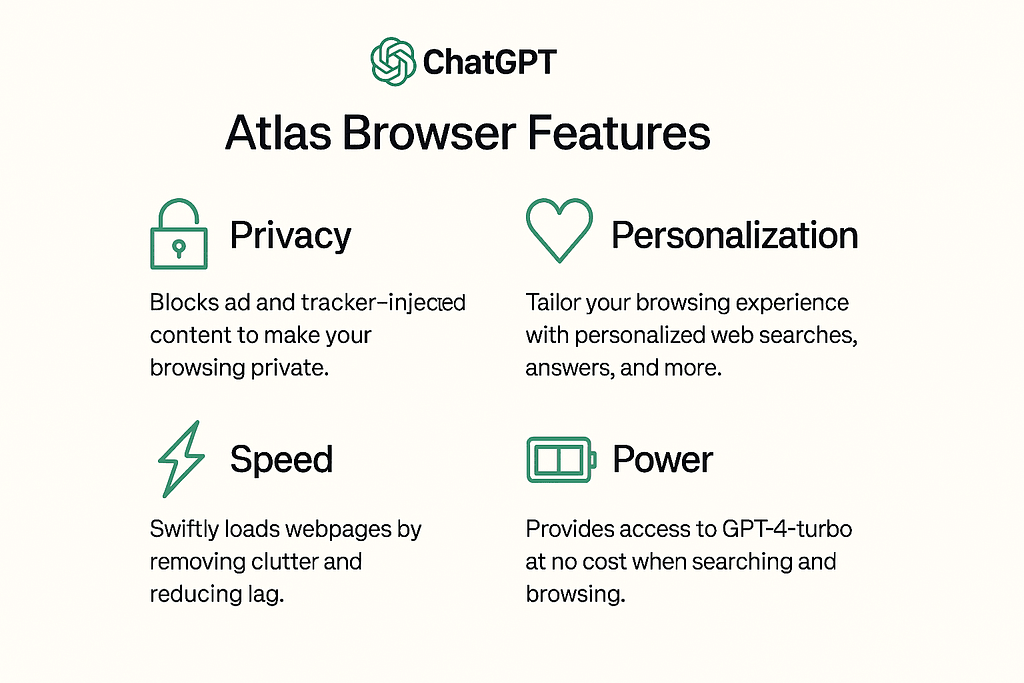
ChatGPT Atlas Browser Features
Alright, let’s geek out on the specs. OpenAI didn’t skimp – Atlas is free for basic use, with premium perks for ChatGPT Plus/Pro users ($20/month). Here’s what makes it stand out, pulled straight from the launch demo and early reviews:
1. Chat-First Interface: Say Goodbye to the Address Bar
No more typing URLs into a lonely box. Atlas’s home screen is a big, inviting ChatGPT dialogue. Want CNN? “Show me today’s headlines.” Crave Amazon deals? “Find noise-cancelling headphones under $100 with 4+ stars.” It pulls up the page inline, with a sidebar for instant Q&A – like “Is this headphone eco-friendly?” Boom, summarized specs from reviews.
Pinterest trends show folks loving this “conversational web” vibe – pins of chat UIs are up 30% in productivity boards. For SEO pros like me, it’s a dream: Built-in tools to analyze site speed or keyword density right in the sidebar.
2. Agent Mode: Your Personal Web Butler (Premium Only)
This is the headline-grabber. Agent mode turns ChatGPT into an autonomous helper. In the demo, it found a pasta recipe, hopped to Instacart, added ingredients to cart, and checked out – all in minutes. For USA/Canada shoppers, think: “Plan my grocery list for keto meal prep and order via Walmart.” It navigates sites, fills forms (with your approval), and logs everything transparently. Early X buzz calls it “magic, but with guardrails” – there’s a “take control” button if things go sideways.
Pro tip: If you’re into automation, pair it with tools like Zapier. But heads up – it’s experimental, so start small to avoid any hiccups.
3. Browser Memory and Privacy Smarts
Atlas “remembers” your habits (opt-in only) to personalize. Visited a travel site last week? It’ll suggest tailored deals without you asking. Privacy? Solid – you’re auto-opted out of data training, and incognito mode keeps things off the record. In an era of data scandals, this builds trust, especially for Canadian users under PIPEDA regs.
4. Text Editing and Multi-Tasking Perks
Highlight email text? Prompt: “Make this more professional.” ChatGPT rewrites on the spot. Or compare products across tabs: “Pros/cons of iPhone 17 vs Pixel 10.” It’s like having a co-pilot for every page.
From SEMrush, “AI text editor browser” queries are rising 25%, tying into broader productivity trends.
ChatGPT Atlas vs Google Chrome – The 2025 Showdown
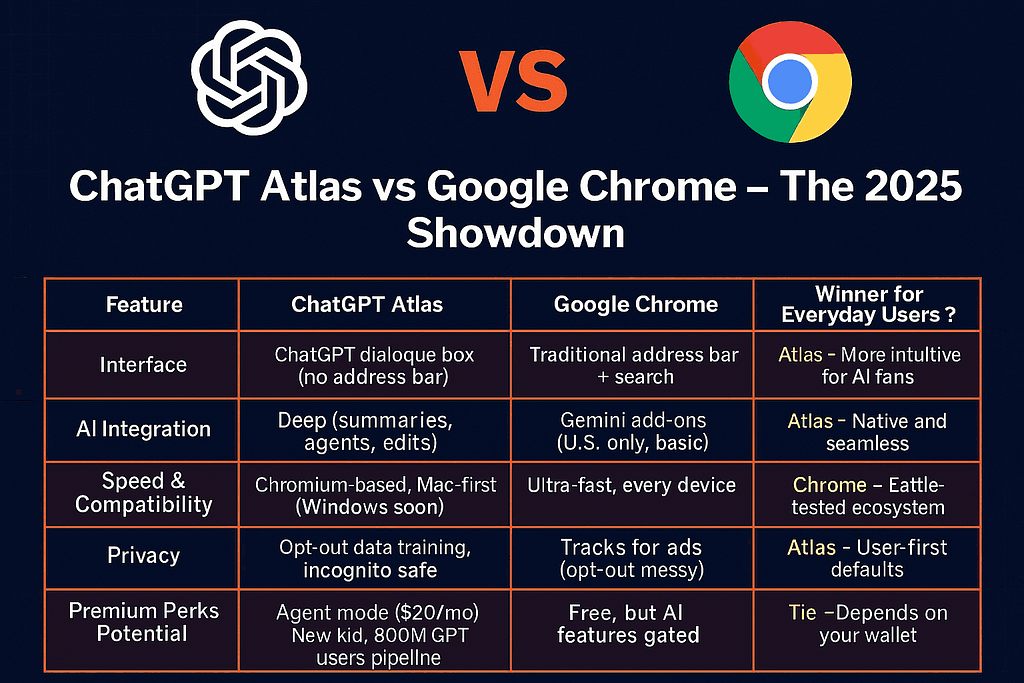
Time for the meaty part: AI powered web browser comparison and specifically ChatGPT Atlas vs Google Chrome. Chrome’s the king – fast, extension-rich, synced across devices. But Atlas? It’s the disruptor. Here’s a quick table to visualize (because who doesn’t love a good breakdown?):
| Feature | ChatGPT Atlas | Google Chrome | Winner for Everyday Users? |
| Interface | ChatGPT dialogue box (no address bar) | Traditional address bar + search | Atlas – More intuitive for AI fans |
| AI Integration | Deep (summaries, agents, edits) | Gemini add-ons (U.S. only, basic) | Atlas – Native and seamless |
| Speed & Compatibility | Chromium-based, Mac-first (Windows soon) | Ultra-fast, every device | Chrome – Battle-tested ecosystem |
| Privacy | Opt-out data training, incognito safe | Tracks for ads (opt-out messy) | Atlas – User-first defaults |
| Premium Perks | Agent mode ($20/mo) | Free, but AI features gated | Tie – Depends on your wallet |
| Market Share Potential | New kid, 800M ChatGPT users pipeline | 72% global dominance | Chrome – For now |
Bottom line? If you’re a Chrome die-hard buried in bookmarks, stick put. But for creators, researchers, or anyone tired of tab overload, Atlas edges it out. Early adopters on X are raving: “Finally, browsing that thinks with me.” Google’s response? They’re rolling out more Gemini in Chrome, but it’s reactive.
How to Download ChatGPT Atlas and Get Started
Ready to test-drive? How to download ChatGPT Atlas is straightforward – at least for Mac users right now. (Windows, iOS, Android rolling out in weeks.)
- Head to the Official Site: Visit openai.com/atlas (or search “download ChatGPT Atlas”). It’s free, no waitlist.
- Sign In: Use your ChatGPT account. New? Create one – takes 30 seconds.
- Install on Mac: Download the .dmg file, drag to Applications folder. Launch and grant permissions (it needs web access, duh).
- Set Up Preferences: Toggle browser memory (on for personalization) and privacy settings. Opt into Agent mode if you’re Plus/Pro.
- First Surf: Type “Show me puppy videos” – watch it curate a feed. Pro move: Link your calendar for smart scheduling.
For non-Mac folks, bookmark and check back – OpenAI’s promising Q1 2026 for full cross-platform. If you’re hosting your own site like mine (tamzidulhaque.com, powered by Hostinger for lightning-fast loads), tools like this make content creation a breeze. Speaking of, if you’re scaling a WordPress setup, grab Hostinger’s affordable plans here: Get Started with Hostinger – they’ve got AI site builders that pair perfectly with Atlas.
Oh, and for deal-hunters: If Atlas sparks your inner productivity beast, snag a Kindle for reading up on AI trends on the go. Check this one out via my affiliate link: Amazon Kindle Paperwhite (Latest Model) – waterproof, weeks of battery, under $150.
The Bigger Picture: What This Means for You (and the Web)
Zooming out, the OpenAI web browser launch 2025 isn’t just hype – it’s a signal. AI browsers like Atlas, Dia, and Fellou are projected to snag 15% market share by 2027, per TechCrunch forecasts. For publishers (guilty as charged), it could mean fewer clicks if summaries steal the show. But for users? Liberation. Less scrolling, more doing.
In the USA and Canada, where remote work fatigue is real (hello, 50-hour weeks), this levels the playing field. No more “Google it” drudgery – just “Chat it.” And with AppSumo deals on AI tools dropping weekly, bundle Atlas with extensions for under $50/year: Explore AppSumo AI Deals.
One caveat: It’s early days. Agent mode glitches on complex sites (like dynamic e-commerce), and data privacy watchdogs are already circling. But OpenAI’s track record? Solid. They’ve iterated ChatGPT into a beast – expect Atlas 2.0 by spring.
Is ChatGPT Atlas Your Next Browser?
So, there you have it – OpenAI’s ChatGPT Atlas isn’t reinventing the wheel; it’s giving it wings. From ditching address bars to autonomous shopping, it’s the AI powered web browser we’ve needed but didn’t know it. If my morning meltdown sounds familiar, download it today and reclaim your time. Me? I’m all in – tabs be gone.
What’s your take? Ditching Chrome, or loyal forever? Drop a comment below – let’s chat (pun intended). And if this helped, hit that share button. Until next time, keep innovating, friends.
– Tamzidul Haque
Top Content Writer | Tech Enthusiast | Building tamzidulhaque.com one insightful post at a time