Are you uploading videos consistently but watching your view count stay stuck? You’re not alone. Many creators pour hours into editing, thumbnails, and titles—only to overlook one small but powerful element: YouTube tags to get views.
While YouTube officially states that tags play a minimal role compared to titles, thumbnails, and descriptions, real-world creator data from 2025 shows that smart tagging still helps the algorithm categorize your content, surface it in related videos, and match it to search queries—especially for smaller channels.
In this in-depth guide, you’ll learn exactly how to select and use YouTube tags to get more views, including proven strategies for 2026, common mistakes to avoid, and practical examples you can copy today.
Whether you’re just starting out or scaling an existing channel, mastering tags is a low-effort way to give your videos an extra edge in discoverability.
What Are YouTube Tags and Do They Still Matter in 2026?
YouTube tags are hidden descriptive keywords (up to 500 characters total) that you add when uploading or editing a video. They tell the algorithm what your video is about beyond the title and description.
According to official YouTube Help:
“Tags are descriptive keywords you can add to your video to help viewers find your content. Your video’s title, thumbnail, and description are more important pieces of metadata for your video’s discovery. Tags can be useful if the content of your video is commonly misspelled. Otherwise, tags play a minimal role in your video’s discovery.”
Yet experienced creators report 20-50% better initial performance when using targeted tags, especially for niche content or Shorts. Tags help with:
- Search rankings (especially long-tail phrases)
- “Suggested videos” and related content placement
- Helping the algorithm understand misspellings or variations
- Boosting Shorts feed visibility when combined with hashtags
In 2026, tags matter most for new or small channels trying to break into competitive niches.
Why Smart Tags Help You Get More Views : best YouTube tags 2026
The YouTube algorithm prioritizes watch time, engagement, and relevance. Good tags improve relevance signals, increasing the chances your video appears in:
- YouTube Search results
- Suggested videos sidebar
- Home feed recommendations
- Shorts shelf/feed
Creators who mix broad + specific tags often see higher impressions in the first 24-72 hours, leading to more views if the content retains viewers.
Step-by-Step: How to Research and Choose High-Impact YouTube Tags(YouTube hashtags for views)
Follow this process every time you upload.
- Start with Keyword Research
Use YouTube’s search bar autocomplete:
- Type your main topic → note suggestions (these are real searches)
- Tools like TubeBuddy, vidIQ, or free Keyword Tool for YouTube reveal search volume and competition.
Look for:
- High-search, low-competition phrases (long-tail keywords)
- Variations and misspellings
Example: Instead of just “weight loss,” use “weight loss for beginners at home no equipment”
- Mix Tag Types for Maximum Reach
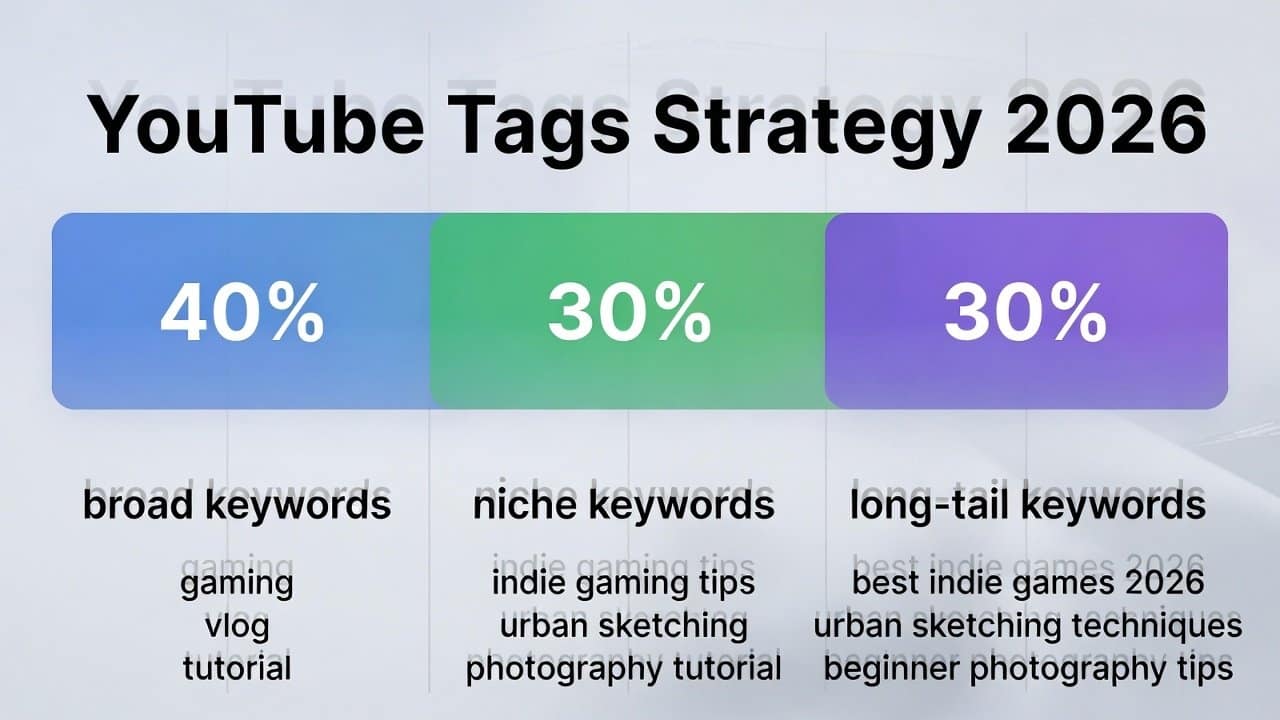
Best practice in 2026: Use a balanced mix:
- Broad tags (high volume, competitive) — 20-30% of your tags Examples: #youtube, #shorts, #viral, #trending, #fyp
- Niche/specific tags (targeted, lower competition) — 40-50% Examples: “keto recipes for beginners,” “solo travel tips Europe”
- Long-tail tags (exact viewer searches) — 20-30% Examples: “how to start a YouTube channel in 2026 with no money”
- Branded or series tags — if applicable Example: Your channel name or video series
Recommended distribution:
- 1-2 exact title match
- 3-5 broad category
- 5-10 specific/long-tail
- 2-3 trending/viral boosters (if relevant)
Keep total under 15-20 tags to avoid dilution.
- Incorporate Hashtags Strategically
Hashtags (#) work differently—they appear clickable above the title (top 3 most relevant) and in descriptions.
For regular videos: Add 3-5 in description.
For Shorts: 3-8 hashtags (mix broad + niche) perform best.
Order matters: Put largest/most relevant first.
Popular 2026 hashtags:
- General: #Shorts #YouTubeShorts #Viral #Trending #FYP #Explore
- Niche examples: #FitnessMotivation #Gaming #TechReview #ASMR
Avoid over 15 total hashtags—YouTube may flag as spam.
Common YouTube Tagging Mistakes to Avoid
- Stuffing irrelevant popular tags (hurts relevance)
- Using only broad tags (too competitive)
- Ignoring long-tail opportunities
- Adding too many tags (>500 characters)
- Forgetting variations/misspellings
- Not updating old videos with better tags
Real-World Examples of Effective YouTube tags to get views
Example 1: Fitness Tutorial Video
Title: “10-Minute Home Abs Workout for Beginners 2026”
Tags:
- 10 minute abs workout
- home abs workout beginners
- abs workout at home
- beginner abs workout
- fitness
- workout
- abs
- home workout
- #absworkout #fitness #homeworkout #shorts #viral
Example 2: Gaming Shorts
Title: “Minecraft But Everything is Random”
Tags:
- minecraft
- minecraft shorts
- minecraft funny
- minecraft random
- gaming
- minecraft gameplay
- #minecraft #gaming #shorts #minecraftshorts #viral
Example 3: Tech Review
Title: “Best Budget Smartphone 2026 Under $300”
Tags:
- best budget smartphone 2026
- budget phone 2026
- smartphone under 300
- best phone under 300 dollars
- tech review
- smartphone review
- #tech #smartphone #budgetphone #gadgets
Copy, adapt, and test these structures.
Tools to Find Winning Tags Faster
- Free: YouTube search suggest, Google Trends (YouTube filter)
- Paid/Free Trial: TubeBuddy, vidIQ (tag explorer, competitor tags)
- AI Generators: TunePocket, Keyword Tool, vidIQ tag generator
Advanced Tips for 2026 Algorithm on how to use YouTube tags
- Prioritize watch time over tags—tags get impressions; retention gets push
- Update tags on underperforming videos after 1-2 weeks
- For Shorts: Focus on 3-5 strong niche hashtags + broad ones
- Monitor Analytics → see which traffic sources grow (search vs suggested)
- Combine with strong titles/thumbnails for compound effect
YouTube SEO tags : Tags Are Your Secret Supporting Actor
YouTube tags won’t make a bad video go viral—but they can help great content reach the right eyes faster.
Focus 80% on creating valuable, retentive videos. Use the remaining 20% to optimize tags with research, balance, and relevance.
Implement these strategies on your next upload and track impressions/views in YouTube Analytics over 7-14 days. Small tweaks compound into big growth.
Ready to level up your channel? Start by auditing your last 5 videos’ tags today.
Want more actionable creator tips delivered straight to your inbox?
Subscribe to my newsletter for weekly insights on content growth, SEO, and monetization.
Check out my other writings:
TAMZIDUL HAQUE Writer
https://tamzidulhaque.com/ | https://medium.com/@tamzidulhaque |
Read More- Royalty Free Sound Effects for Videos: Best Free Sources in 2026 (No More Muted Edits!)
Unlock the YouTube Shorts Hook Formula: Go Viral in 2026 with These Proven Tips!
How long should a YouTube video be for maximum engagement?
Perplexica Advanced Configurations: Go Beyond Basic Setup in 2026
FAQ on YouTube tags to get views
Do YouTube tags still help get more views in 2026?
Yes, though minimally compared to titles, thumbnails, and watch time. Strategic tags improve categorization, search matches, and suggested video placement—especially useful for new channels.
How many tags should I use on YouTube?
10-15 relevant tags (under 500 characters total). For Shorts, focus on 3-8 strong hashtags in the description.
What are the best YouTube tags to get views?
Mix broad (#shorts, #viral) with specific long-tail phrases matching viewer searches. Use tools like vidIQ or YouTube autocomplete for ideas.
Should I use hashtags in YouTube tags?
You can, but hashtags work best in descriptions/titles for clickable visibility. Tags are plain keywords.
Can I copy tags from other videos?
Analyze competitors’ tags via tools, but always customize to your exact content. Irrelevant copying hurts performance.
Where do I add tags on YouTube?
In YouTube Studio → upload/edit video → Details tab → Tags section.
Are tags more important for Shorts or long videos?
Shorts benefit heavily from hashtags in descriptions for feed visibility. Long videos rely more on detailed keyword tags for search.
What happens if I use too many tags?
YouTube may ignore them or flag as spam, reducing effectiveness.
How do I find trending tags for my niche?
Check YouTube search suggest, trending videos in your category, or tools like TubeBuddy/VidIQ.
Do tags affect monetization or AdSense?
Indirectly—better discoverability means more views → faster to 1,000 subs/4,000 watch hours for AdSense eligibility.