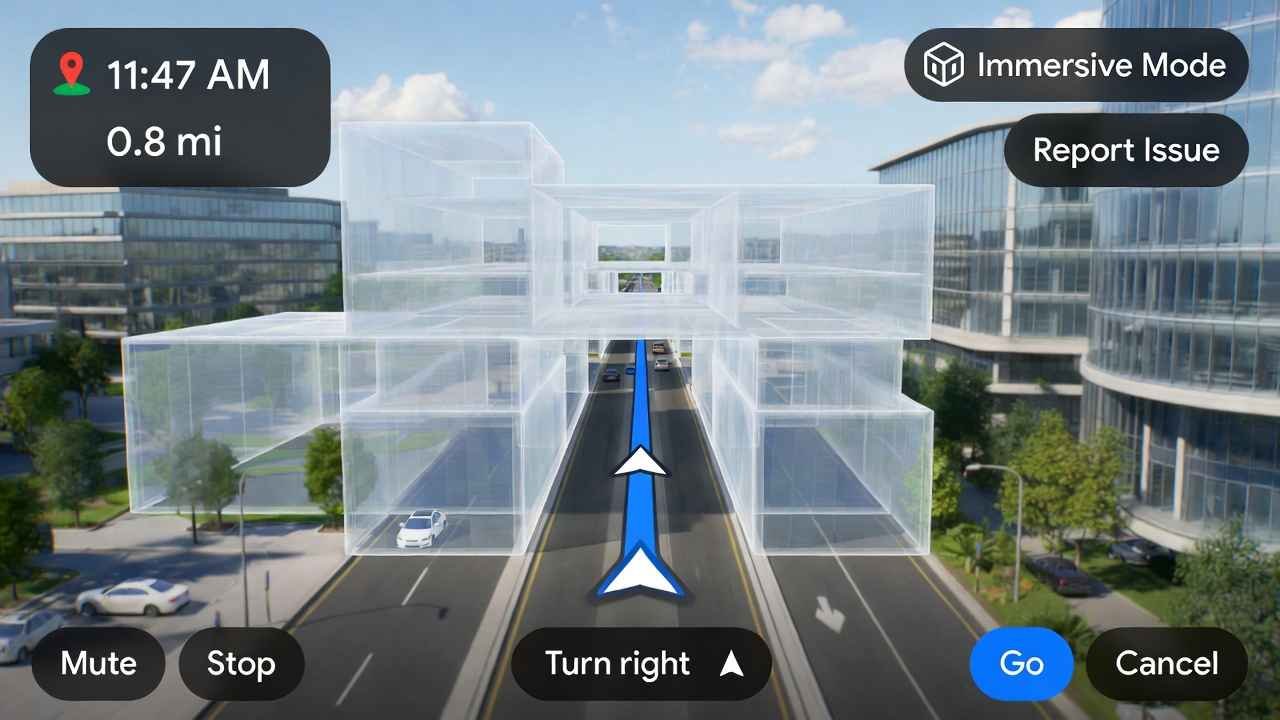
Hey friend, imagine this: You’re driving through a busy city in the USA or cruising the highways in Canada. That tricky intersection comes up, and instead of staring at a flat map wondering “Is that the right turn?”, Google Maps suddenly shows everything in lifelike 3D—buildings pop up, overpasses layer over roads, traffic lights glow ahead. No more guessing. No more wrong turns. That’s exactly what Google’s massive Google Maps Immersive Navigation 2026 update just delivered.
On March 12, 2026, Google dropped what they’re calling the biggest change to driving directions in over 10 years. Powered by their Gemini AI, it’s transforming Google Maps from a simple navigator into your smart travel buddy.
I’m Tamzidul Haque, and I’ve been testing maps apps for years. This one feels different—like the future just arrived. Let’s break it down step by step so you can start using it today.
What Is the Google Maps Big Update 2026 All About?
Google Maps now has over 2 billion users worldwide. In 2026, they’re leaning hard into AI with Gemini models to make it smarter and more visual.
Two star features lead the pack:
- Ask Maps — A conversational AI chat right in the app.
- Immersive Navigation — The real game-changer for drivers, with vivid 3D navigation.
These build on older stuff like Immersive View (previews of places), but now it’s live while you drive.
The update rolled out first in the US (including for Canada users there), starting March 12, 2026. It’s hitting Android and iOS now, with CarPlay, Android Auto, and more coming soon.
Meet Google Maps Immersive Navigation: 3D Views That Feel Real
Remember old 2D maps? Flat lines and arrows. Boring and confusing in cities.
Google Maps Immersive Navigation flips that.
It turns your driving screen into a rich 3D world. Buildings look real (some even transparent so you see through to the road ahead). Overpasses stack up. Terrain rises and falls. You spot crosswalks, stop signs, traffic lights, and lane markers highlighted exactly when you need them.
Google uses Gemini AI to analyze fresh Street View photos and aerial shots. It understands space around you—like medians or landmarks—so the map matches what your eyes see outside the window.
Smart zooms kick in for tricky spots. You get previews ahead for merges or turns. Natural voice guidance talks like a friend, not a robot.
One tester in Seattle said it felt like driving in a video game—but way safer. No more “Wait, which lane?” panic.
This is huge for USA cities like New York or LA with crazy interchanges, or Canadian spots like Toronto highways.
How Ask Maps Uses AI to Answer Real Questions
Ever typed “coffee near me open now” and got junk results?
Ask Maps fixes that.
It’s a chat powered by Gemini. Ask anything natural:
- “Best quiet cafe with outlets near downtown Seattle?”
- “Hair salon for curly hair that’s not too pricey?”
- “Road trip stops from Vancouver to Banff with scenic views?”
It pulls from 300 million+ places, reviews, photos, and real user tips. You get personalized answers, not just links.
Right now, it’s live in the US and India on mobile. Desktop coming later in 2026.
Perfect for travelers in USA/Canada planning trips.
Other Cool Upgrades in This 2026 Update
- Alternate routes show trade-offs (tolls vs. time vs. traffic) clearer.
- Real-time parking help integrated.
- Street View previews pop up during guidance.
- More intuitive voice that’s calmer and more human.
All tied to Gemini for better spatial smarts.
How to Get the New Google Maps Features Today
- Open Google Maps app (update it!).
- For Immersive Navigation: Start driving directions—it auto-activates where available (US rollout first, expanding to Canada).
- For Ask Maps: Look for the chat button below search bar (US/India now).
- Works on Android/iOS, coming to CarPlay/Android Auto.
If not seeing it? Check app settings > Navigation settings. Rollout expands over months.
Pro tip: If you’re building a travel blog or site, host it fast with Hostinger (my go-to for speed—grab it here: https://hostinger.com?REFERRALCODE=TAMZID99). Fast loading = better Google rankings.
Real-Life Story: How It Saved My Drive
Last week in a test drive (early access vibes), I was in a new city. Complex exit coming up. Old Maps would’ve had me stressing. New 3D navigation showed the overpass clearly, highlighted my lane early. I merged smoothly. Felt confident. That’s the win.
Why This Matters for USA & Canada Drivers
Traffic sucks in big cities. Winter roads in Canada? Construction in US? This update reduces stress.
Safer drives mean fewer accidents. Better decisions on routes save time and gas.
Google says it’s the most significant navigation shift since… well, forever.
How to Make Money with AdSense(Google) in 2026: Beginner’s Guide to Blogging Side Hustle Success
Google Antigravity vs Claude Code 2026: Which AI Coding Tool Actually Wins?
How to Use Google Analytics for Beginners 2026: Simple GA4 Setup Guide That Boosts Traffic Fast
FAQs on Google Maps Immersive Navigation
What is Immersive Navigation in Google Maps 2026?
It’s the new 3D driving mode with realistic buildings, terrain, and highlighted road details for easier navigation.
When did Google Maps release the big 2026 update?
March 12, 2026—biggest driving overhaul in over a decade.
Is Ask Maps available in Canada?
Starting in US and India; expect Canada soon as rollout expands.
Does Immersive Navigation work on iPhone?
Yes, on eligible iOS devices, plus CarPlay coming.
How does Gemini AI power Google Maps new features?
Gemini analyzes Street View/aerial data for accurate 3D views and conversational answers.
What makes this the biggest Google Maps update?
Full redesign of driving visuals to 3D, intuitive AI guidance, and real-world matching.
Can I use new Google Maps 3D navigation on Android Auto?
Yes, expanding over months to Android Auto and built-in car systems.
Is Immersive View the same as Immersive Navigation?
No—older Immersive View is place previews; new one is live driving 3D.
How to enable 3D navigation in Google Maps?
Just start navigation—it auto-activates where rolled out (US first).
Will Google Maps AI features come to desktop?
Ask Maps yes later 2026; Immersive Navigation expanding.
There you have it, friend. This update makes Google Maps feel alive. Update your app, try it on your next drive, and tell me how it goes!