Hey friend, imagine this.
You’re juggling 10 tabs, hunting for the best flight deal, comparing reviews, checking your Gmail for dates, and filling out a form.
Exhausting, right?
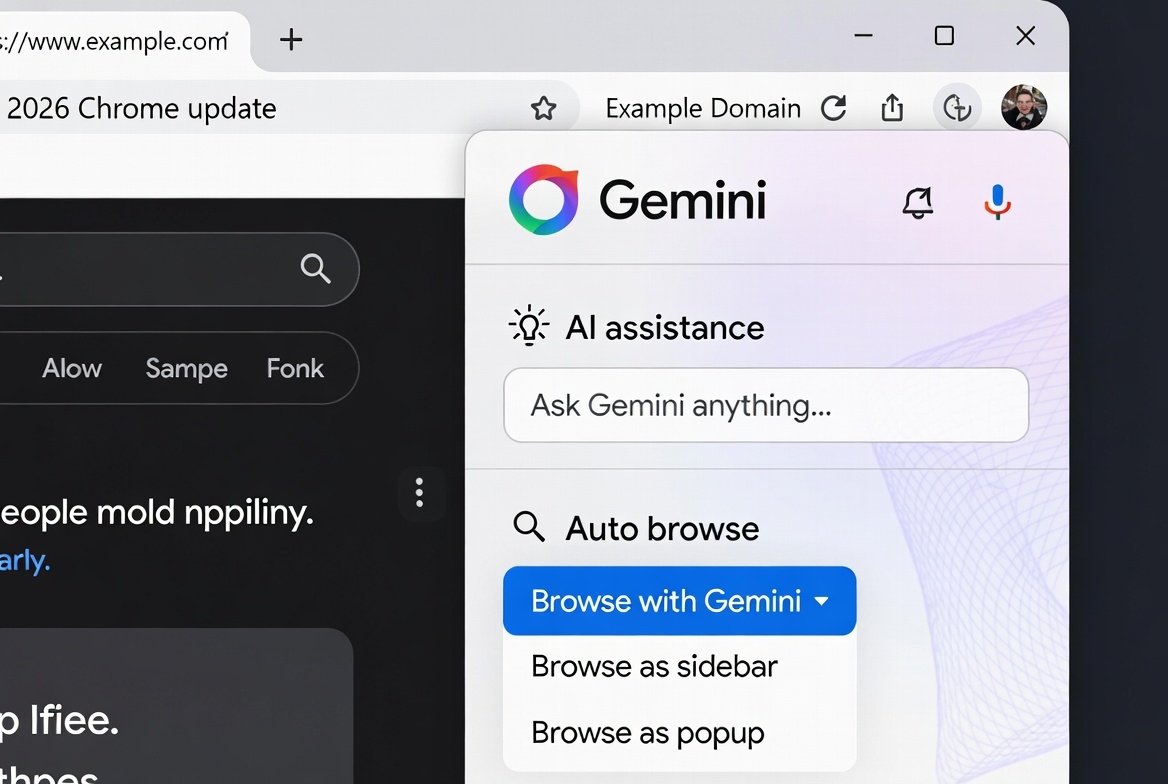
Last week (Jan 28, 2026), Google flipped the script. They pushed the Gemini side panel Chrome live, packing proactive AI in Chrome that actually does the work for you.
No more endless clicking.
Chrome becomes your personal assistant right in the browser.
Built on Gemini 3 – Google’s sharpest model yet – it brings a side panel that sticks around, deeper app ties, image magic with Nano Banana, and the game-changer: Gemini side panel Chrome.
I tested it myself (as a blogger who lives in tabs). It saved me 2 hours on research.
Ready to see how? Let’s dive in like we’re chatting over coffee.
What Is the Gemini 3 Chrome Update All About? Chrome auto browse feature
Google announced this on their blog Jan 28, 2026.as Gemini side panel Chrome
Gemini in Chrome features now use Gemini 3 for smarter help.
Key goal? Make browsing proactive, not reactive.
Instead of you searching everything, Chrome suggests, acts, and finishes tasks.
Available now on Windows, macOS, and Chromebook Plus (US rollout first, English primary).
Pro and Ultra subscribers get early agentic perks.
But even free users see big wins with the side panel.
The New Gemini side panel Chrome: Always There When You Need It
Picture this: You open Chrome.
A clean side panel sits on the right.
Gemini lives there – no pop-ups, no switching windows.
Click the Gemini icon (or shortcut). Boom – chat ready.
Ask about your current tab: “Summarize this article.”
Or across tabs: “Compare prices on these laptops.”
It sees open tabs, history, past chats.
Multitasking feels natural.
I used it to plan a trip. One prompt compared hotels across sites while I read reviews.
No tab chaos.
Pro tip: Pin it open for constant help.
This Gemini side panel Chrome is rolling out now to all Gemini users in the US.
Chrome Auto Browse AI: Let Gemini Do the Clicking for You
This blew my mind.
Chrome auto browse AI is agentic – meaning Gemini acts on your behalf.
For Google AI Pro/Ultra subscribers in the US (preview now).
Say: “Find cheap flights to NYC next month, check my Gmail calendar for free dates, book the best one under $400.”
Gemini opens tabs, searches, compares, fills forms, even uses Password Manager if needed.
It handles:
- Scheduling appointments
- Filling tedious forms
- Getting quotes (plumbers, etc.)
- Managing subscriptions
- Renewing licenses
You watch or approve steps.
Safety first – you’re in control.
I tried a simple version: “Research best noise-canceling headphones under $200.”
It pulled reviews, prices, pros/cons – saved 45 minutes.
This is proactive AI in Chrome at its best.
Personal Intelligence Coming Soon: Chrome Knows You Better
In coming months, Personal Intelligence hits Chrome.
Already in Gemini app.
Opt-in connects Gmail, Photos, YouTube, Search, Calendar, Maps.
Gemini remembers context.
Ask: “When’s my next family trip? Suggest outfits from my Photos.”
Or: “Draft email about that meeting from my calendar.”
It gives tailored, proactive suggestions.
Privacy? You control connections/disconnects anytime.
No training on your data.
This turns Chrome from tool to trusted partner.
Nano Banana in Chrome: Edit Images Without Leaving Your Tab
Fun bonus: Nano Banana integration.
Gemini’s image tool.
Generate or edit photorealistic pics right in side panel.
Prompt: “Add a beach background to this product photo.”
Or mix images: “Put this chair in the room from that tab.”
Great for bloggers, shoppers, creators.
All powered by Gemini 3.
No extra apps needed.
How to Get Started with Gemini(Gemini side panel Chrome) Features Today
Super simple.
- Update Chrome (latest version).
- Sign in Google account.
- Enable Gemini if prompted (US English first).
- Click side panel icon.
- For auto browse: Need AI Pro/Ultra (check one.google.com).
Free tier gets side panel, summaries, basic help.
Paid unlocks full power.
Pro tip: Start with simple prompts like “Explain this page simply.”
Build from there.
Real-Life Wins: How Proactive AI in Chrome Saves Time
Let me share a quick story.
I’m Tamzidul Haque, running sites like tamzidulhaque.com and passiveprofitsworld.com.
Daily: Research affiliates, write posts, check trends.
Before: 3–4 hours tab-hopping.
Now: “Summarize top AI tools 2026 from these tabs.”
Gemini does it.
“Find Hostinger deals and compare.” (Yes, I love Hostinger – fast hosting, AI tools built-in. Grab it here if you need: https://hostinger.com?REFERRALCODE=TAMZID99 – supports my work too!)
Auto browse could research keywords while I write.
Time back for family or more content.
You too – students, pros, shoppers – all win.
Read more Google Maps Just Got a Massive Gemini AI Upgrade in 2025 — Why It’s a Game-Changer in 2026.
How to Use Gemini in Google Docs: Complete 2026 Update & Tips
Why This Update Matters in 2026 Chrome auto browse feature
Browsers evolve.
From static pages to AI partners.
Gemini 3 Chrome update leads the pack.
Agentic AI (auto actions) is the future.
Competitors watch.
But Google’s ecosystem (Gmail, Drive, etc.) gives edge.
For USA/Canada users: Early access means advantage.
Stay ahead.
Potential Downsides and Privacy Tips
Honest talk.
Auto browse needs trust.
Preview stage – bugs possible.
Always review actions.
Privacy: Opt-in only. Disconnect anytime.
Google says no personal data training.
Use strong passwords.
Enable 2FA.
Safe browsing stays on.
Future of Chrome with Gemini: What’s Next?
More coming.
Deeper integrations.
Mobile Chrome too? Likely.
Gemini 3 improves fast.
Expect better reasoning, more tasks.
Chrome might become full AI hub.
FAQs: Gemini 3 in Chrome update Features
What is the Gemini 3 Chrome update?
Latest Jan 2026 refresh adding Gemini 3 power for smarter, proactive browsing in Chrome.
How do I enable Gemini in Chrome?
Update Chrome, sign in, click side panel icon. US English users first.
What is Chrome auto browse AI?
Agentic feature (Pro/Ultra) where Gemini handles multi-step web tasks like booking or research for you.
Is the Chrome Gemini side panel free?
Yes – basic access free. Advanced like auto browse needs paid plan.
Is Gemini AI better than ChatGPT : Gemini vs Chatgpt 2026 Ai War People asking
When does Personal Intelligence come to Chrome?
Coming months after Jan 2026 – opt-in for personalized proactive help.
Can Gemini in Chrome edit images?
Yes, with Nano Banana – generate/edit pics in side panel.
Is Gemini in Chrome available in Canada?
Rolling out US first, but Canada often follows quick – check updates.
What devices support Gemini 3 Chrome update?
Windows, macOS, Chromebook Plus desktops.
How proactive is AI in Chrome now?
Very – suggests actions, remembers context (with opt-in), automates chores.
Does Chrome auto browse use my passwords?
Only if you allow via Password Manager – full control.
There you have it, friend.
The Gemini 3 Chrome update changes how we browse.
Proactive, helpful, time-saving.
Try it today – your tabs will thank you.
Questions? Drop in comments.
I’m Tamzidul Haque – follow my writing at:
https://tamzidulhaque.com/ | https://passiveprofitsworld.com/ | https://appsoftguide.com/ | Medium @tamzidulhaque | Writers Hive & Substack.