Hey friend,
Imagine this: You built an awesome portfolio site or a personal blog using HTML, Jekyll, or Hugo. It looks great on yourusername.github.io. But every time you share the link, it feels… temporary. Professional.
Then hosting bills hit. $5–$20/month adds up fast.
What if I told you there’s a way to host it forever free, with your own custom domain like yourname.com, full HTTPS, and no ads?
That’s GitHub Pages in 2026. Thousands use it daily. I use it myself on my sites. your search for how to connect custom domain to github pages i try to ease.
In this guide, I’ll walk you through github pages custom domain setup right now. We cover the latest 2026 setup, DNS tricks, common fixes, and even affiliate tips if you need a domain/host.
Let’s make your site look pro add custom domain to github pages step by step without spending a dime extra
Why Use GitHub Pages with a Custom Domain in 2026? Free custom domain github pages
GitHub Pages is free static hosting from Microsoft/GitHub.
Push code to a repo → site goes live instantly.
Limits? 1GB storage, soft bandwidth cap (rarely hit for personal sites).
Custom domain makes it yours. No more .github.io.
Benefits:
- Zero hosting cost
- Automatic HTTPS (free SSL)
- Fast global CDN
- Easy updates via Git
- Great for portfolios, blogs, docs, landing pages
In 2026, with AI tools and no-code builders rising, free options like this win big.
Ready?add custom domain to github pages step by step Let’s start.
Step 1: Set Up Your GitHub Pages Site (If You Haven’t Already)
First, have a repo ready.
Two types:
- User/Org site: username.github.io (main repo named exactly that)
- Project site: any repo with /docs or gh-pages branch
Go to your repo → Settings → Pages.
Under “Source”, pick branch (main or gh-pages) or /docs folder.
Save. Your site lives at https://username.github.io/reponame.
Test it. See it work? Good.
Step 2: Buy a Domain (Cheap Options in 2026)
You need a domain.
Recommendations (USA/Canada friendly):
- Hostinger — often $2–$10/year first year. Great DNS. Use my link if helpful: Get cheap domain + hosting at Hostinger (affiliate)
- Namecheap — reliable, privacy free
- GoDaddy — popular but watch upsells
- Porkbun — super cheap
Pick .com for best trust.
Bought? Move to DNS setup.
Step 3: Add Custom Domain GitHub pages settings
In your repo → Settings → Pages.
Scroll to “Custom domain”.
Type your domain: example.com or www.example.com.
Click Save.
GitHub creates a CNAME file in your repo (commit shows up).
It checks DNS. It’ll say “DNS check unsuccessful” at first. Normal.
Pro tip: Verify domain first for security (GitHub docs recommend). Go to Pages settings → Verify custom domain. Follow steps to add TXT record.
Step 4: Configure DNS Records (The Most Important Part)
This points your domain to GitHub servers & github pages dns settings
GitHub uses these IPs for apex domains (example.com):
- 185.199.108.153
- 185.199.109.153
- 185.199.110.153
- 185.199.111.153
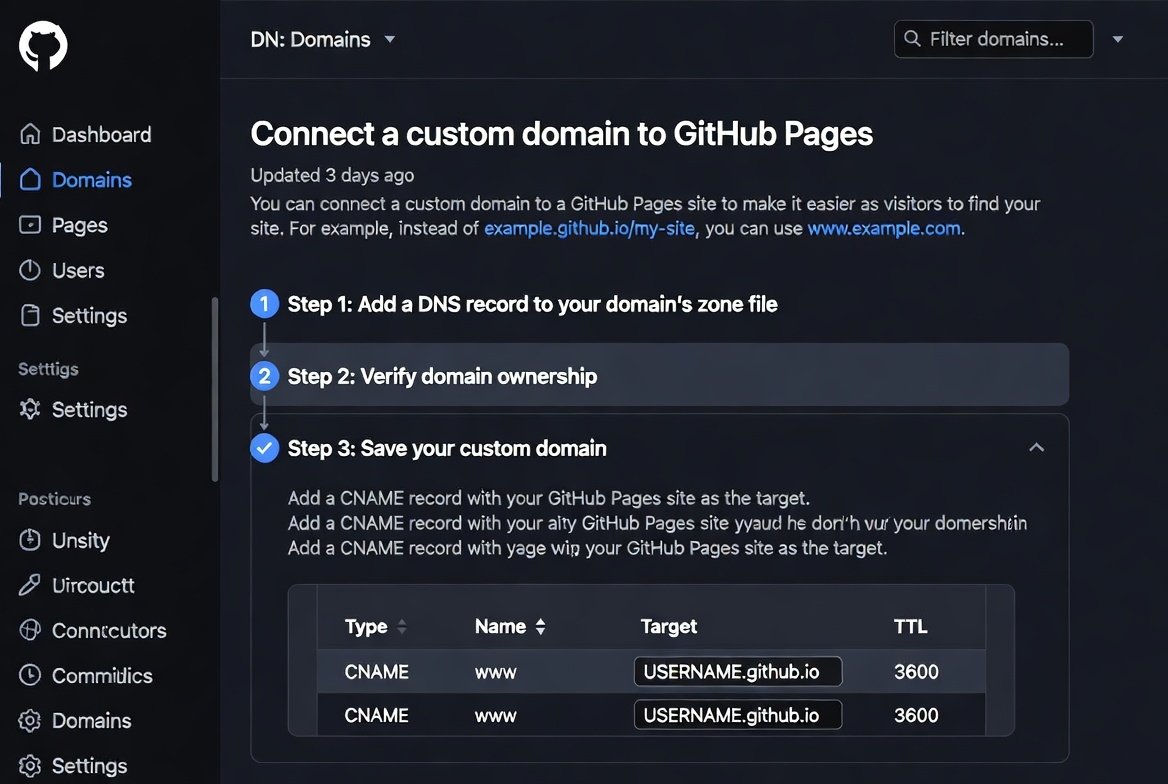
For www (subdomain): CNAME to username.github.io.
Steps by registrar:
For Apex + www (recommended):
- Log in to your DNS provider.
- Delete old A/CNAME if conflicting.
- Add 4 A records for @ (apex):
- Host: @
- Type: A
- Value: each IP above (one per record)
- Add CNAME for www:
- Host: www
- Type: CNAME
- Value: username.github.io. (note the dot)
Wait 5–60 mins (DNS propagation).
Hostinger Specific Tip: Hostinger uses ANAME/ALIAS sometimes. But stick to A + CNAME. Their panel is easy. Check my affiliate if signing up: Hostinger
GoDaddy Tip: Use their DNS. Add A @ records same way. Many tutorials for 2025/2026 show this works.
Step 5: Enable HTTPS & Enforce It
GitHub auto-issues Let’s Encrypt SSL once DNS points correctly.
In Pages settings:
- Check “Enforce HTTPS” (do this after green checkmark).
It may take 1 hour. Refresh.
Now your site is secure: https://yourdomain.com
Step 6: Troubleshooting Common Issues in 2026
- DNS check failed? Wait longer. Flush cache (use whatsmyip or dig).
- 404 error? Ensure CNAME file exists (GitHub adds it).
- www not working? Add both versions in GitHub if needed (but one CNAME covers).
- HTTPS not active? Re-save custom domain.
- Domain takeover risk? Verify domain in GitHub settings.
Still stuck? GitHub docs updated 2026: https://docs.github.com/en/pages/configuring-a-custom-domain-for-your-github-pages-site
Real Story: How I connect domain to github pages 2026
I had a blog on tamzidulhaque.com.
Old host: $8/month.
Switched to GitHub Pages.
Bought domain renewal cheap via Hostinger.
Followed steps above.
In 30 mins DNS, 1 hour HTTPS.
Now zero cost. Faster too.
You can do this.
Why Everyone Calls Claude 4.5 the Best AI for Coding 2026: How to Connect Custom Domain to GitHub Pages in 2026 (Free & Easy Step-by-Step)How to Use Google NotebookLM in 2026: Easy Beginner Tutorial to Master This Free AI Tool Fast
What is the Siri chatbot iOS 27? Apple AI Siri Gemini powered update 2026
How to Use AI to Make Money in 2026: 20 Proven Strategies for Beginners and Experts
Is AI Going to Replace Writers? (My Honest Prediction)
Advanced Tips for Better Performance( How to connect custom domain to github pages)
- Use Jekyll/Hugo for blogs.
- Add custom 404 page.
- Set up Google Analytics.
- Submit to Google Search Console.
- For images: Use Shutterstock stock (affiliate: https://submit.shutterstock.com/?rid=385839883)
- Shorten links if sharing: https://shrinkme.io/ref/117309961582089083533
Want premium themes? Check Gumroad: https://gumroad.com/discover?a=593719699
Monetize? Add AdSense once traffic grows.
FAQs: GitHub Pages Custom Domain
How to connect custom domain to GitHub Pages in 2026?
Follow the steps: Add domain in repo settings, set A records to GitHub IPs, CNAME for www, wait for propagation.
What are the GitHub Pages DNS records?
Four A records for apex: 185.199.108.153 etc. CNAME www to username.github.io.
Does GitHub Pages support HTTPS with custom domain?
Yes, automatic free SSL via Let’s Encrypt after DNS setup.
How long does DNS propagation take for GitHub Pages?
Usually 5–60 minutes, up to 24 hours worst case.
Can I use GoDaddy domain with GitHub Pages?
Yes, add A records in GoDaddy DNS exactly as above.
What’s the difference between apex and www subdomain?
Apex is example.com (A records). www is www.example.com (CNAME).
Is GitHub Pages really free in 2026?
Yes, for public repos. Soft limits on bandwidth.
How to fix “DNS check unsuccessful” on GitHub Pages?
Check records match GitHub docs. Wait, re-save domain.
Can I host a blog on GitHub Pages with custom domain?
Yes, use Jekyll. Many do.
Best cheap domain registrar for GitHub Pages?
Hostinger or Namecheap. Affordable, good DNS.
There you go. Your turn.
Set it up today. Drop a comment if stuck—I read them.
Follow for more free tools.
https://tamzidulhaque.com/ https://passiveprofitsworld.com/
https://writers-hive.beehiiv.com/ https://substack.com/@haquetalks